 Tunquest
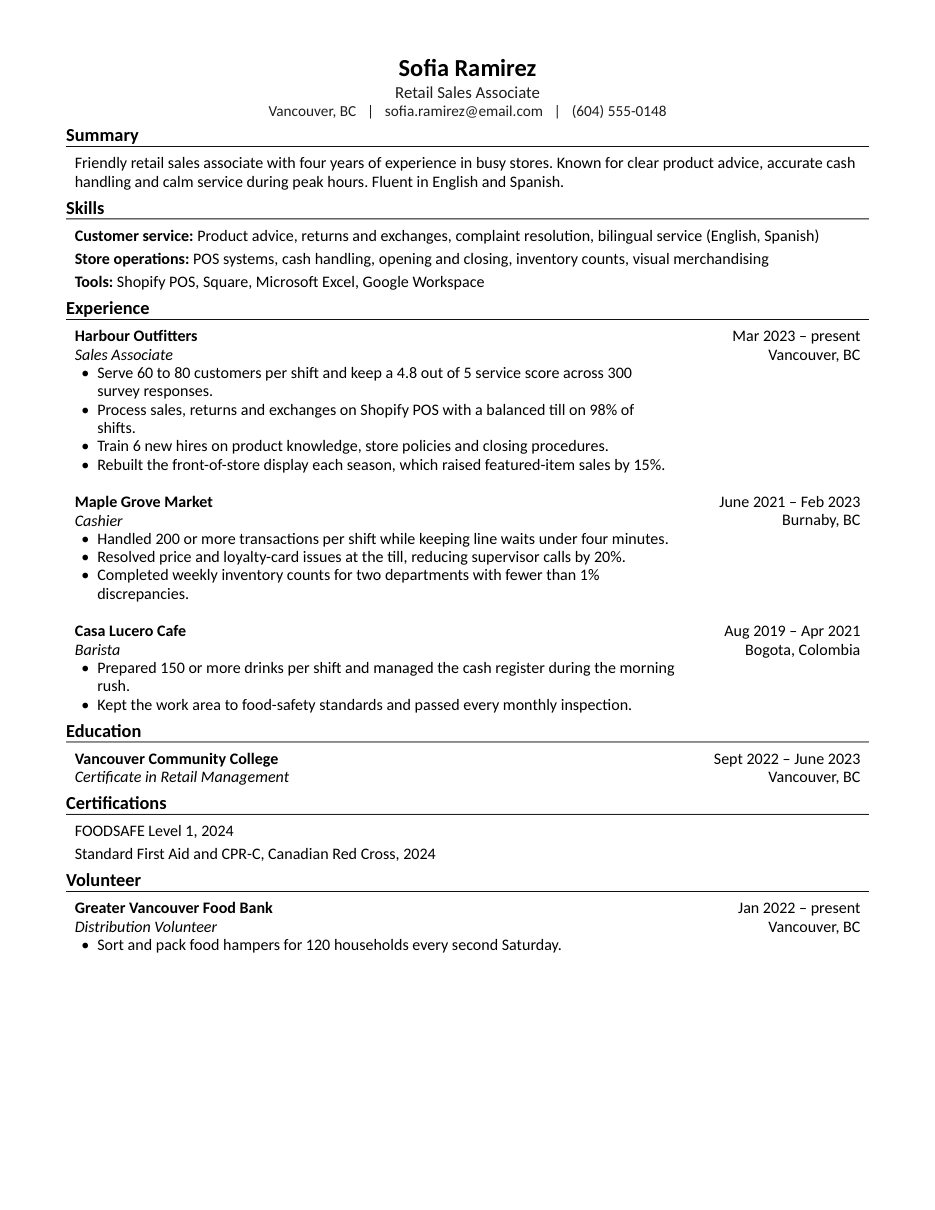
What the WorkBC format looks like
- One column, top to bottom. No sidebars, icons, photos or skill bars. Every line is real text a person or a parser can read.
- Calibri-style font in black. The name is bold and slightly larger; section headings are bold with a full-width line under them.
- Dates and city on the right. Each job shows the employer in bold, the job title in italics, and month-and-year dates aligned to the right margin.
- Plain section names: Summary, Skills, Experience, Education, Certifications and Volunteer.
Who it's for
- People working with a WorkBC Centre or an employment counsellor who want a resume in the format they were shown.
- Retail, hospitality, warehouse, trades, care and office jobs, where hiring managers expect a traditional layout.
- Newcomers to Canada who need a clean, Canadian-style resume quickly.
- Anyone applying through job boards or company portals that scan resumes automatically.
What goes in each section
| Section | What to include | WorkBC-style detail |
|---|---|---|
| Header | Name, target job title, city and province, one phone number, one email | No birthdate, marital status or photo |
| Summary | 2–3 lines: your role, years of experience, one or two strengths | Use words from the job posting |
| Skills | 3 labelled groups (for example: customer service, store operations, tools) | Include languages you speak |
| Experience | Employer, job title, city, month/year dates, 2–4 bullets with results | Most recent job first; jobs outside Canada count |
| Education | School, credential, city, dates | Courses and certificates that fit the job |
| Certifications | First aid, FOODSAFE, Serving It Right, forklift, WHMIS | Add the year; drop ones that don't fit the job |
| Volunteer | Organization, role, dates, one bullet | Especially useful with little Canadian experience |
Weak vs. strong bullets
Helped customers.
Serve 60 to 80 customers per shift and keep a 4.8 out of 5 service score across 300 survey responses.
Worked the cash register.
Process sales, returns and exchanges on Shopify POS with a balanced till on 98% of shifts.
Did inventory.
Completed weekly inventory counts for two departments with fewer than 1% discrepancies.
Common mistakes
- Two phone numbers and two emails. Pick one of each.
- Dates without months ("2021 – 2023"). Use month and year.
- The same resume for every job. Swap in the skills and keywords from each posting.
- "References available upon request" at the bottom. It wastes a line.
- Spelling mistakes. Read it aloud or ask your counsellor to check it before you send it.
Make your own WorkBC-style resume
- Upload your current resume (PDF, DOCX or TXT) or paste the text into the free builder. No account needed.
- Choose the Job centre (WorkBC) template to get this exact look, or compare it with the other five.
- Review every line, then download your PDF. Downloads are free; your upload is deleted within 30 minutes.
With a free account, Tunquest finds up to 3 matching jobs a day in Canada and tailors your resume to each one. You review everything before you apply.
Frequently asked questions
Is this the official WorkBC resume template?
No. Tunquest isn't affiliated with WorkBC. This template follows the simple, traditional format that WorkBC's own resume tips and job-centre workshops recommend, so you can build that style in a few minutes and download it as a PDF.
Can I use it outside British Columbia?
Yes. It's a plain Canadian resume format that works for jobs anywhere in Canada. Nothing in it is specific to B.C. except the sample's city.
Is the WorkBC template ATS-friendly?
Yes. Like all six Tunquest templates, it's a single-column, text-based PDF with standard section names, so applicant tracking systems can read it.
Should I put references on it?
Not unless the employer asks. WorkBC suggests keeping references for when they're requested and asking each person for permission first.